
Docs / 08 Check a spec
awcp
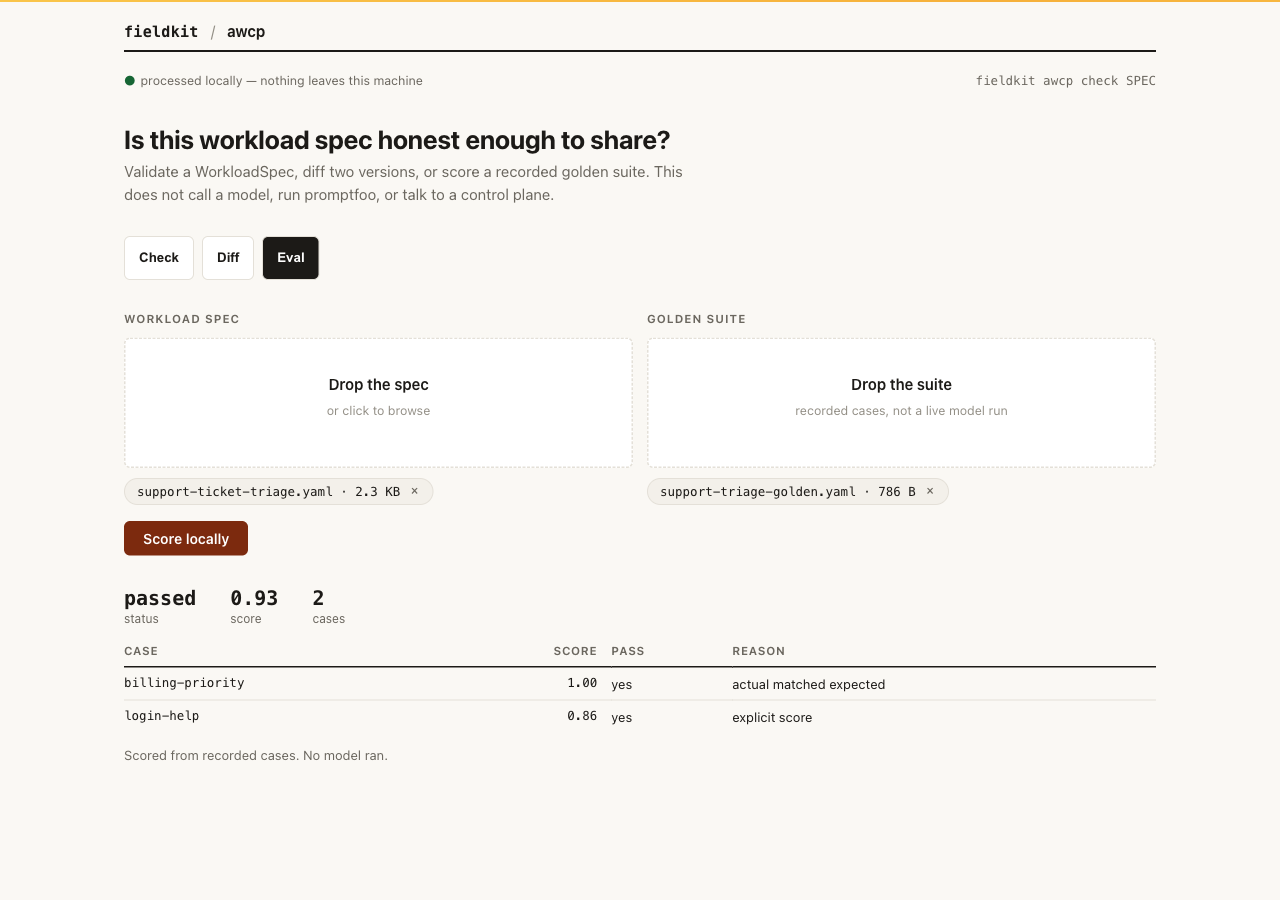
Point awcp at a WorkloadSpec and it tells you whether the file is well-formed, what changed since the last version, and whether a recorded golden suite still clears the gates. It does not call a model, run promptfoo, or talk to a control plane.
When to reach for it
Someone hands you an AI workflow YAML and asks if it is safe to promote.
Run check first. You get structural errors, a config hash,
declared tools, and high-risk names that are missing an approval flag
before the spec leaves your laptop.
What it does
Three commands, all local:
-
checkloads YAML or JSON, validates the WorkloadSpec shape (metadata, schemas, model route, eval gates, policies, privacy flags, tool declarations), fingerprints config and prompt files, and lists allowed tools with approval and risk tokens. -
diffwalks two specs and labels each change as model, prompt, tool, policy, retrieval, or config. -
evalscores a golden suite file against the spec's gates. Cases carry recordedactual/expectedvalues or an explicitscore. Safety gates such asmaxPiiLeakageRatefail closed if a required measurement is missing.
This is the honest slice of AWCP: the local spec and golden-eval machinery that was already complete. It is not a delivery control plane. There is no org registry, no OIDC, no canary rollout, no LiteLLM call, and no network.
Install and run
Already running the fieldkit core? The tool is one
plugin add away:
fieldkit plugin add awcp
fieldkit awcp check workload.yaml
Working from the fde-fieldkit repo instead? You need
uv; one uv sync installs
the core and every tool editable:
uv sync
uv run fieldkit awcp check examples/awcp/support-ticket-triage.yaml
Every flag
check
| Flag | Default | What it does |
|---|---|---|
SPEC |
required | WorkloadSpec YAML or JSON file to validate and fingerprint. |
--json PATH |
off | Also write the check as JSON for scripts and agents. |
--html PATH |
off | Also write a printable HTML report. |
--help |
Show usage and exit. |
diff
| Flag | Default | What it does |
|---|---|---|
BEFORE |
required | Earlier WorkloadSpec. |
AFTER |
required | Later WorkloadSpec. |
--json PATH |
off | Also write the categorized diff as JSON. |
--html PATH |
off | Also write a printable HTML report. |
eval
| Flag | Default | What it does |
|---|---|---|
SPEC |
required | WorkloadSpec whose eval gates are applied. |
--suite PATH |
required | Golden suite YAML or JSON with recorded cases. |
--artifact-dir DIR |
~/.fieldkit/awcp-artifacts |
Where the local result.json is written. Older builds used ./.awcp-artifacts and do not move those files; pass --artifact-dir to keep reading them. |
--json PATH |
off | Also write the eval run as JSON. |
--html PATH |
off | Also write a printable HTML report. |
Worked examples
1. First look at a workload spec
The plain run prints the name, project, config hash, prompt fingerprint
modes, and declared tools. Prompt refs under the spec's directory are
hashed as content; paths outside that directory stay ref
hashes and are not read.
uv run fieldkit awcp check examples/awcp/support-ticket-triage.yamlsupport-ticket-triage · customer-success-ai · ok
config sha256:bada678688eef6c479f592f47f2f682541a8be62b4c5c6f0a1f9fb205b953839
prompts 2 (system=content, userTemplate=content)
┃ name ┃ approval ┃ risk ┃
│ jira.create_internal_note │ none │ — │
│ zendesk.draft_reply │ required │ — │
local check only — no model, control plane, or network call2. What changed between two versions
diff is for the “what did we actually change in this YAML”
conversation. Categories keep model, prompt, tool, policy, and retrieval
edits from collapsing into one blob.
uv run fieldkit awcp diff examples/awcp/support-ticket-triage.yaml examples/awcp/support-ticket-triage-v2.yamlsupport-ticket-triage.yaml → support-ticket-triage-v2.yaml
Changes · 8
┃ kind ┃ path ┃
│ model │ spec.modelRoute.primary │
│ prompt │ spec.prompts.system.version │
│ retrieval │ spec.retrieval.freshnessDays │
│ tool │ spec.tools.allowed │
│ policy │ spec.policies.requiredPacks │
(8 rows; before/after columns trimmed for width)3. Score a recorded golden suite
eval does not generate model output. The suite file already
contains scores or actual/expected pairs. Field Kit averages those scores,
applies the stricter of the spec gates and the suite gates, and writes a
local artifact. If a safety gate is set and a case omits that measurement,
the run fails closed instead of treating the gap as zero.
uv run fieldkit awcp eval examples/awcp/support-ticket-triage.yaml --suite examples/awcp/support-triage-golden.yamlsupport-triage-golden-v1 · passed · 0.93 · 2 cases
┃ gate ┃ value ┃ limit ┃
│ overall │ 0.93 │ 0.82 │
│ p95 ms │ 620 │ 12000 │
│ billing-priority │ 1.00 │ actual matched expected │
│ login-help │ 0.86 │ explicit score │
scored locally from recorded cases — no model ranLimits, stated plainly
- No model is called. A
runner: promptfoolabel in a suite file is recorded, not executed. - No control-plane API, approvals, canary, or evidence bundle is shipped in this plugin.
- Tool risk is a name/scope heuristic. It is not an authorization decision.
- Prompt files are only read when the ref stays inside the spec's directory.
- Detection of a valid spec is not a production-readiness claim.
Next steps
If the spec is about to be shared and still contains customer text, run scrub on the source files first. If you need to see where a coding agent actually connected while you were editing the spec, that is netwatch.