
Docs / 07 Observe
netwatch
netwatch shows which network destinations an AI coding agent reaches. It launches a command through local HTTP and SOCKS5 proxies, stores metadata in SQLite, groups endpoints by service and host, and gives you a local control room for capture, policy, reports, and coverage diagnostics.
Coverage before counts Run mode sees traffic routed through its proxies. HTTPS content stays encrypted. Attach mode samples established TCP sockets and cannot block. DNS, UDP/QUIC, and direct sockets that bypass the proxies are not captured.
Meet the local control room
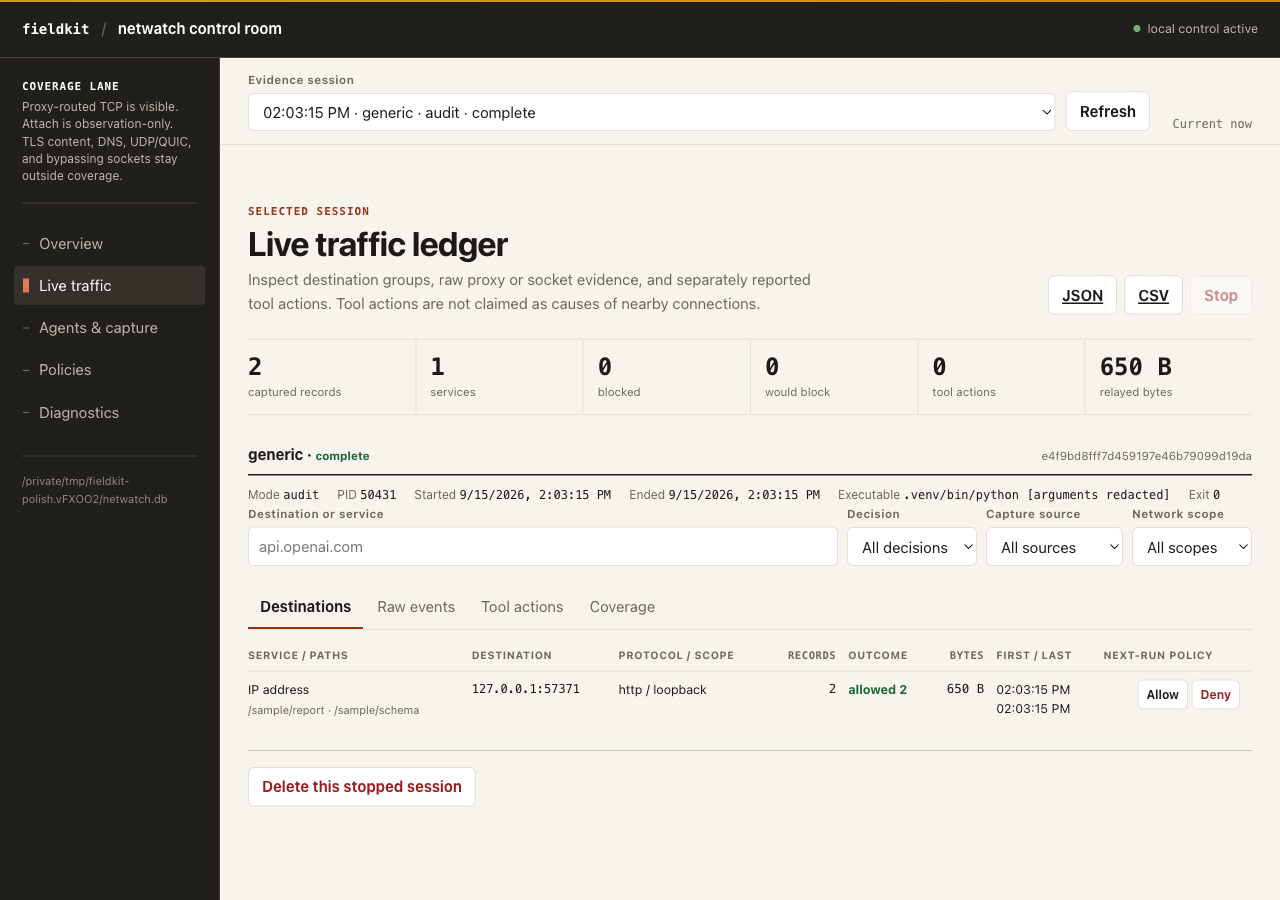
Run fieldkit serve and open netwatch from the printed hub URL.
The server prefers port 8765 and picks a free loopback port if that one is
taken. The
dashboard keeps the active coverage lane visible, separates proxy requests,
tunnels, socket observations, and supported tool actions, and marks every
total with its real unit. It reads the same SQLite evidence as the CLI.
| Workspace | What you can do |
|---|---|
| Overview | Compare saved sessions, agent classes, capture sources, destinations, outcomes, and relayed bytes. |
| Live traffic | Filter one session by destination, service, decision, capture path, or network scope; inspect grouped and raw evidence; export JSON or CSV; stop a run owned by this server; delete stopped evidence. |
| Agents & capture | Discover Codex and Claude Code processes, launch a noninteractive direct-argument command in audit or enforce mode, attach by PID, or copy the terminal command for an interactive agent. |
| Policies | Set the default action; add, edit, reorder, or remove rules; turn a destination into a future allow or deny rule; import, export, and save JSON; simulate a decision before a run. |
| Diagnostics | Check local proxy, attachment, Codex, and Claude capabilities and read the evidence contract and blind spots on the current machine. |
Local controls have a hard boundary Mutations require a direct loopback browser, loopback Host, same-origin JSON, and a per-process control token. Non-loopback serving leaves netwatch as a read-only evidence viewer. The browser accepts neither arbitrary database nor policy paths, and it can stop only work started by the current server process.
Install and audit an agent
Add the plugin to an existing Field Kit installation, check the local capture paths, then launch Codex in audit mode. Audit is the default and never blocks.
fieldkit plugin add netwatch
fieldkit netwatch doctor
fieldkit netwatch run -- codex
From a repository checkout, uv installs the core and every plugin editable:
uv sync
uv run fieldkit netwatch doctor
uv run fieldkit netwatch run -- claude
What a run captures
Every supervised command receives upper- and lower-case HTTP, HTTPS, and ALL proxy variables. Supported Codex builds also receive an invocation-only sandbox network-proxy override. Supported Claude Code builds receive an invocation-only, fail-closed sandbox configuration and a hook that reports sanitized tool metadata. Neither integration edits a global settings file.
The database keeps the session and executable name but drops every command argument. It stores destination host and resolved IP, port, protocol, IP scope, decision, matching rule, timing, and byte totals. A plaintext HTTP request can add its method and sanitized path. URL queries, headers, bodies, prompts, Bash commands, and search queries are never stored. HTTPS contributes only its CONNECT or SOCKS destination unless a supported agent hook provides a sanitized URL.
Build and enforce a policy
Policies are versioned JSON with an explicit default action. Start from a policy that allows loopback and denies everything else, append only the services the agent needs, then check a destination before running in enforce mode.
fieldkit netwatch policy init policy.json
fieldkit netwatch policy add policy.json --action allow --id anthropic-api --host api.anthropic.com --port 443 --protocol https
fieldkit netwatch policy add policy.json --action deny --id telemetry --host '*.sentry.io'
fieldkit netwatch policy check policy.json https://api.anthropic.com
fieldkit netwatch run --mode enforce --policy policy.json -- claude
A rule can match exact or wildcard hosts, IP addresses or CIDRs, ports, and
protocols. Categories combine with AND; repeated values within one category are
alternatives. Deny wins when rules conflict. Private, loopback, link-local, and
reserved destinations need a matching allow rule with
allow_private: true.
| Host pattern | Matches |
|---|---|
api.example.com | That exact host. |
*.example.com | Subdomains, not the apex. |
**.example.com | The apex and every subdomain. |
* | Every host. |
Inspect and control sessions
Select a session for destination groups, raw captured events, supported agent tool actions, and exact coverage notes. The dashboard can export JSON or CSV, stop a supervised run or attachment it owns, and delete a stopped session after confirmation. It never labels tool actions as the cause of nearby connections.
fieldkit netwatch sessions
fieldkit netwatch report SESSION_ID
fieldkit serve
Attach to an existing process
agents finds running Codex and Claude processes. attach
samples established TCP sockets for a PID and all visible descendants with
lsof. Repeated snapshots are deduplicated. They remain socket
observations, not request counts, and attachment cannot enforce policy.
fieldkit netwatch agents
fieldkit netwatch attach 12345
fieldkit netwatch attach 12345 --follow
Command reference
| Command | Purpose |
|---|---|
doctor [--json] | Report capture and agent-integration availability without network access. |
agents [--json] | Find running Codex and Claude processes. |
run [--mode] [--policy] [--db] -- COMMAND | Supervise one command through the local proxies. |
attach PID [--follow] [--interval] [--db] | Sample established TCP sockets; observation only. |
sessions [--json] [--db] | List saved sessions. |
report SESSION [--json] [--db] | Show grouped destinations and raw evidence. |
policy init PATH | Write the loopback-only starter policy. |
policy add PATH | Append a validated allow or deny rule. |
policy check PATH DESTINATION | Explain the decision before a run. |
Hard boundary
A local proxy can enforce only traffic that reaches it. Universal blocking of
arbitrary direct sockets on macOS needs a separately signed Network Extension.
Netwatch does not install one, does not install a certificate authority, and does
not claim whole-machine visibility. Use doctor --json as the source of
truth for the active machine.